Learning Unreal Engine so far is completely different from learning Unity. In Unity, I focused on learning C#, and learning how to create items through code. So far in Unreal Engine I’ve mostly focused on learning the engine, itself, and how to create and manipulate assets and objects within the engine, instead of focusing on C++. That being said, it has been very cool to learn so far, and I’m sure I’m going to enjoy learning it further!
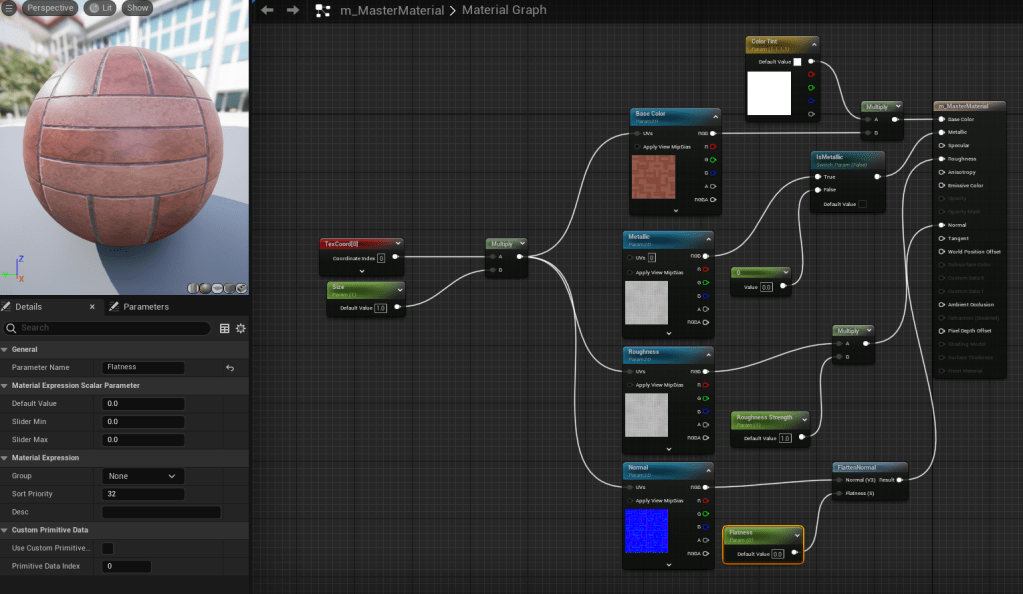
Something this tutorial focuses heavily on is materials. Specifically, how to make simple customizable materials with the standard, included, assets Unreal has to offer, with the help of some assets created by the presenter. We first started by creating the base color, metallic values, roughness, and what is called the “normal” in the material settings. Once it was at a good point, we changed many of those same pieces into parameters, allowing it to be edited live in an instanced version of the material.
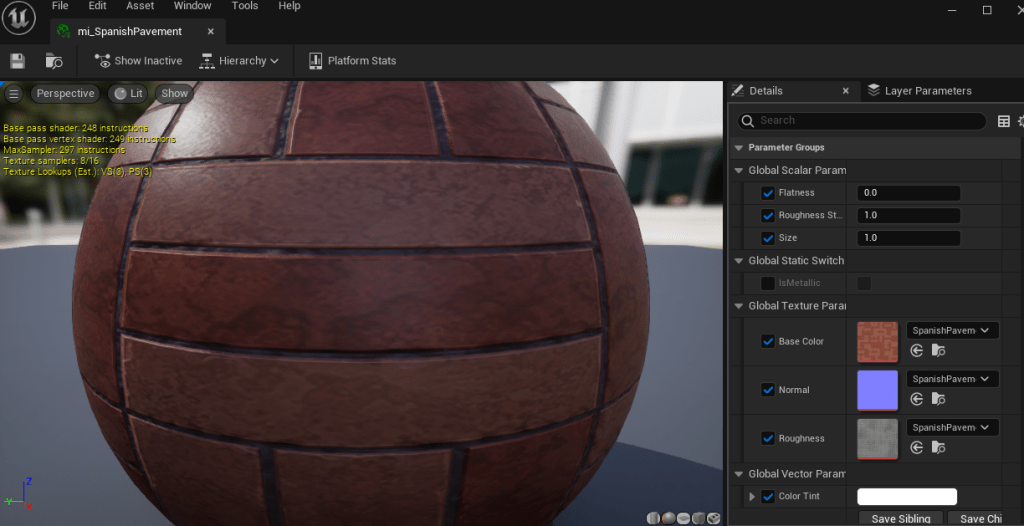
As you can see in the image above, this is the instanced version of the original material. Anything on the right with a checkbox allows us to change those variables in real time to see in the scene. We could even change the base texture from pavement to grass, or water, if we needed to. Overall Unreal Engine feels like a completely different beast, but I have yet to focus on the actual code and have only been focused on the engine itself.
 Maverick Learns